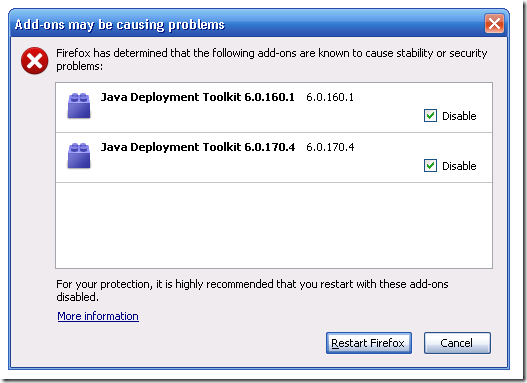
I recognize that this post is about to be little more than a complaint (as i’m not sure what better behavior would be, I don’t claim to know good design, thats what the UX team exists for), but I recall seeing somewhere, (I think it was Jennifer Boriss’ blog) a discussion about Firefox dialogs that get in the users way (specifically add-on updates.) So this complaint is along those same lines… to draw a bit of attention to it.
This dialog has greeted me twice in the past couple of days (I’m thinking on two different machines, not sure), it doesn’t appear at the beginning of a browsing session, or at any seemingly predictable time, just randomly in the middle of things. I recognize what the dialog is for (blocklisting) but I’m confused by a few things…
- Why is this particular dialog advocating restarting my session suddenly in the middle of things? (Which for the security case I can see the reasoning for..) but… this is a plug-in, (one I barely knew was here.. so it being turned off doesn’t bother me..) why do I have to restart to disable a plug-in?
- Where did this dialog come from? Is it new to Firefox 3.6? I don’t recall previous versions prompting when the blocklist was invoked. Does this now appear for any blocklisted item?
- What happens if I click cancel, because I’m not ready to abort my browsing session just because this dialog has intruded into my time and asks me to deal with it? I’m assuming, given that Firefox developers are sane (mostly) people, that it just aborts restarting, but I can also see how cancel might be construed in this case to do nothing and leave the vulnerable add-ons enabled.. What actually happens?
- And assuming for a moment, that I’m supposed to make a choice here, since there’s checkboxes and such on this dialog, there’s no information presented to make an informed one. (Yes, I see the More info link that goes to the sorted ascending by date blocklist page that says it tiny print at the bottom there’s a security issue. but that’s investigating the dialog, on a tangent.) The dialog only has vague “stability or security" wording thats used often throughout Firefox So, how am I supposed to know what to do?
Now, don’t misunderstand, I’m supportive of the blocklist feature, and think that the feature is beneficial, and I’m sure the reason this plugin being blocked was a fine idea. I’m questioning if this dialog was well thought out or if its more confusing than its worth (or at the least, a significant cause for confusion for people who have to encounter it). Since previous versions seemed to get along just fine without it.
I consider myself tech-savvy, but when faced with this dialog, I’m definitely finding myself asking.. You’re the program, just deal with it. and let me know what happened so if it is a problem, it can be reverted. What do you want me to do about it?




I got the same pop up tonight and it confused the heck out of me. And going to the plugins UI (after not restarting) did not look nearly menacing enough. Nor does it seem to indicate that it will be disabled after my next restart.
Then again, why do I have to restart to disable a plugin that isn’t in use?
FWIW, the bug to add the blocklist is https://bugzilla.mozilla.org/show_bug.cgi?id=558584
Tell Alexander Limi, I think he’s making a list of things that suck about the Firefox UX.